Publication date: June 2026 Scope: An end-to-end decision guide starting from why local LLM is needed and for whom, all the way to hardware → model → software selection. Note: This field changes very significantly even in a short period. The product names, prices, and benchmark results below are valid as of June 2026; what endures is not the names, but the categories and decision logic. On the hardware side, only NVIDIA is deliberately covered — the main reason is the CUDA ecosystem (see Section 4.1).
Table of contents
- Executive Summary
- 1. Introduction
- 2. Why Local LLM? (Rationale)
- 3. Who Needs It? (Target Audiences and Scenarios)
- 4. Hardware Selection (NVIDIA)
- 4.1. Why NVIDIA? In one word: CUDA
- 4.2. First decision: Training or Inference?
- 4.3. The decisive metric: VRAM (and total memory budget)
- 4.4. How inference works and quality-of-service metrics
- 4.5. Hardware classes (OpenZeka catalog)
- 4.6. Multi-GPU
- 4.7. CPU + RAM only
- 4.8. Scenario → hardware mapping
- 4.9. Operating costs and Total Cost of Ownership (TCO)
- 5. Model Selection
- 5.1. What can you do with a local LLM? (inference use cases)
- 5.2. Model selection criteria
- 5.3. Current open-weight model families (mid-2026)
- 5.4. Parameter size ↔ performance balance
- 5.5. Quantization
- 5.6. Selection by task (including Turkish)
- 5.7. License (commercial use)
- 5.8. Where do you compare models in 2026?
- 5.9. Build your own evaluation (benchmark) set
- 6. Software Selection
- 7. Example Deployment Scenarios
- 8. Risks and Points to Consider
- 9. Conclusion and Recommendations
- Glossary (Terms)
- Resources
Executive Summary
- Local LLM means running the model on your own hardware: data never leaves the device, internet is not required, and there is no per-use fee. The strongest rationale is data privacy and sovereignty (government, healthcare, legal, finance, defense).
- The single hard constraint is VRAM. Real requirement = model weights + KV cache + activations + ~20% headroom; model size and context length determine the hardware class (see 4.3).
- Hardware (NVIDIA only — reason: CUDA): at the edge Jetson → on the workstation RTX PRO Blackwell (16–96 GB) → in the data center L40S / H100·H200 NVL → at large scale DGX Spark / B200·B300. The first question: training or inference?
- Model: for most workloads, 7–14B dense or ~30B MoE is the optimal balance; for commercial use, Apache 2.0 / MIT licensed families (Qwen, DeepSeek, GLM) are the safest foundation. First define what you will do (5.1) and selection criteria (5.2).
- Software: easy start with Ollama / LM Studio; production with vLLM / TensorRT-LLM; for agents + memory, AI workspaces; for multi-user setups, lead with a gateway (LiteLLM, etc.).
- Decision method: start small, measure on your own evaluation set (5.9), and scale as needs clarify. Do not forget TCO in cost (the GPU cost is only 30–40% of the total).
1. Introduction
LLM (Large Language Model) is an artificial intelligence model trained on very large amounts of text data that can understand and generate natural language. Most of us use these via the cloud: services like ChatGPT, Claude, and Gemini run the model on their own servers, and we access it over the internet.
Local LLM means running the model on your own hardware — a laptop, a desktop workstation, or a company server. Data never leaves the device, internet connectivity is not required, and there is no per-use fee.
The key difference between the two approaches is:
| Cloud LLM | Local LLM | |
|---|---|---|
| Where data is processed | On the provider’s server | On your own hardware |
| Cost model | Usage/subscription (ongoing) | Hardware (one-time) + electricity |
| Internet | Required | Not required |
| Privacy | Trust the provider | Full control |
| Model access | Limited to what the provider offers | Free choice among hundreds of open models |
| Customization | Limited | Full (fine-tuning, RAG, own data) |
The purpose of this guide is to provide a current and actionable answer to the question “Is local LLM right for me / my organization, and if so, which hardware–model–software trio should I choose?”
About OpenZeka

OpenZeka Teknoloji A.Ş. was founded in 2016 at Ankara Bilkent Cyberpark and offers innovative AI solutions in hardware and software. It is the Official NVIDIA Robotics Distributor for Turkey and MEA (MENA); it is also an NVIDIA DGX AI Compute Systems and NVIDIA Omniverse Partner, and an Elite Partner in the NVIDIA Visualization field.
- Hardware: DGX/HGX server solutions, professional graphics cards and workstations, NVIDIA Jetson embedded systems (developer kits, ready AI kits, modules, and carrier boards). We design and deploy fully redundant AI infrastructure covering compute, storage, networking, and orchestration.
- Software: With our in-house Cordatus AI platform, we deliver industry-specific solutions, especially in intelligent video analytics.
- Digital transformation: We lead digital transformation with NVIDIA Omniverse and Digital Twin technologies; we share our knowledge at events such as NVIDIA GTC, Embedded World, and Smart City Expo, through university collaborations and AI Workshops.
The hardware recommendations in this guide are based on this portfolio.
2. Why Local LLM? (Rationale)
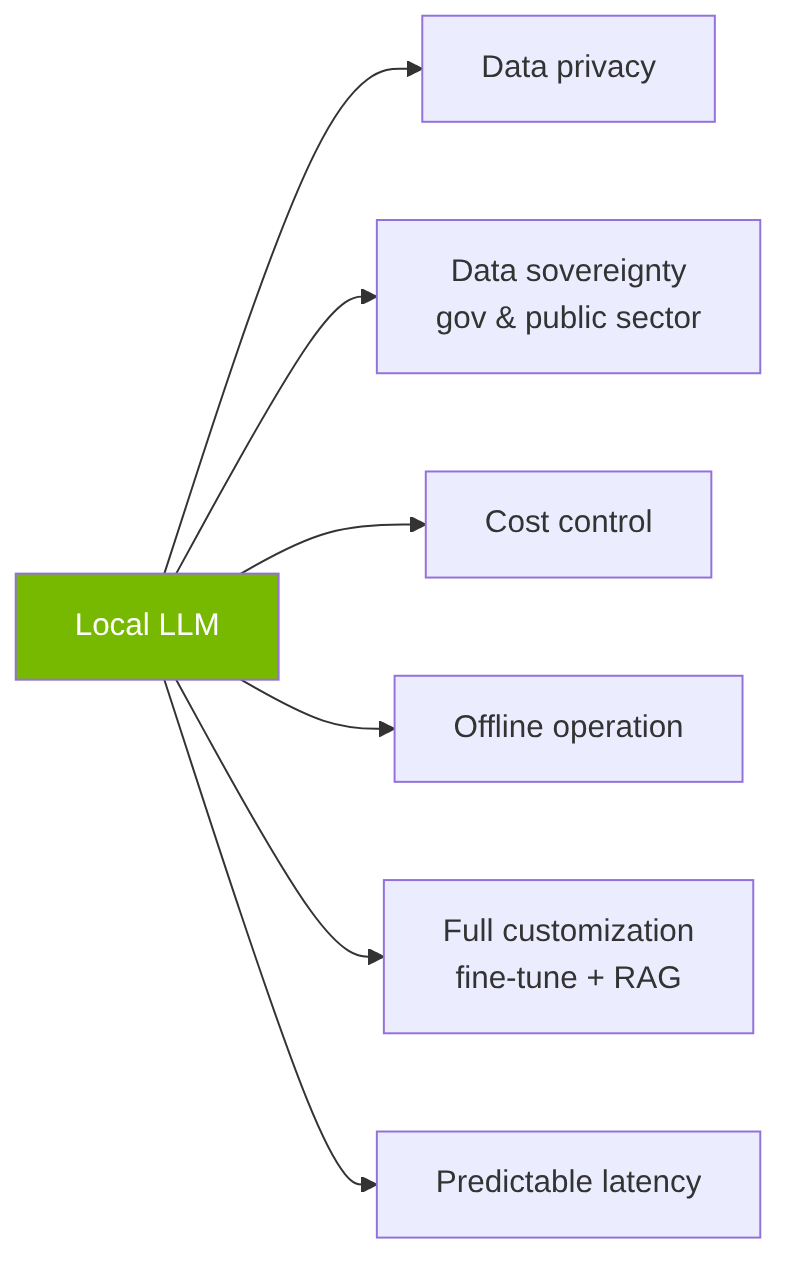
Figure: Key advantages of local LLM
Advantages
Data privacy and security. This is the strongest rationale. In fields such as legal, healthcare, finance, and defense, data never leaves the device; KVKK and GDPR compliance becomes significantly easier. Sensitive customer data, contracts, or patient records are not sent to a third party’s server.
Data sovereignty — government and public institutions. This is one of the most decisive rationales for state agencies, critical infrastructure, and public institutions: with local LLM, corporate/classified information can never leak to overseas or third-party servers under any circumstances. Data is processed entirely within the institution’s own boundaries, on its own hardware; this directly meets data sovereignty and national security requirements. Being able to run even on completely isolated (air-gapped) and classified networks is a critical advantage for these institutions.
Cost. Under intensive and continuous use, a one-time hardware investment eventually falls below the operating expense of cloud equivalents; for teams making large numbers of calls, the marginal cost in a local setup is almost only electricity.
Offline operation. It works in environments without internet (the field, secure networks, air-gapped/isolated systems).
Customization. You can fine-tune on your own data, bind it to your own documents with RAG, and fully control system behavior. Open-weight models do not impose the restrictions that closed services enforce.
Predictable latency. Speed depends on your hardware; you are not subject to provider congestion, quota limits, or service outages.
Points to consider
- Correct hardware matching. Your target model size requires the right VRAM/hardware class; for the most demanding workloads and the largest models, higher-memory cards or multi-GPU plans are needed (see Section 4).
- Upfront investment. Hardware is a one-time investment; properly scaled, it pays for itself over the long term.
- Technical knowledge. Setup, quantization choice, and driver/CUDA management require a learning curve. (New-generation tools have made this significantly easier.)
- Maintenance burden. Updates, model changes, and hardware maintenance are the institution’s responsibility.
Summary: Whenever there are privacy and data sovereignty concerns, intensive use, or a need for customization, local LLM is a strong and sustainable choice. With the right hardware–model–software match, the scale can be adjusted from small to large as needed.
3. Who Needs It? (Target Audiences and Scenarios)

Figure: Who needs local LLM?
Government and public institutions. Ministries, public agencies, critical infrastructure, and defense — keeping data within the country and within the institution’s own boundaries, and preventing it from leaking out, is a data sovereignty and national security requirement. For these institutions, local LLM is often the only suitable option.
Enterprise (sensitive data). Law firms, hospitals/healthcare providers, finance, and defense industry — when keeping data internal is a legal/contractual obligation, local LLM is almost the only option.
Developers. Unlimited prototyping without API costs; IDE integration as a code assistant; workflows with many automated tests/calls.
Researchers and academics. Studying model behavior, running experiments, fine-tuning studies, and scientific work that requires full control over the model.
SMEs. Small and medium-sized businesses that want to build customer service, document processing, and internal automation without exposing customer data.
Individual/privacy-focused users. Personal assistant, note/email management, hobby use; those who do not want to give their data to any company.
Those for whom keeping scale small is enough: For occasional and light use only, an entry-level card or an existing workstation is often sufficient; as needs grow, the hardware can scale gradually (see Section 4).
4. Hardware Selection (NVIDIA)
4.1. Why NVIDIA? In one word: CUDA
The main reason to choose NVIDIA for local LLM hardware is CUDA. CUDA is the software platform NVIDIA offers for parallel computing on GPUs, and it has become the de facto standard of the AI world. Its practical consequences are:
- Ecosystem compatibility. Nearly all LLM tools and libraries — PyTorch, TensorFlow, vLLM, TensorRT-LLM, llama.cpp, Ollama — are developed primarily on CUDA and run best on NVIDIA hardware. Newly released models, quantization formats, and optimizations are published for CUDA first.
- Maturity and prevalence. CUDA has been under development for over a decade; it provides extensive documentation, community support, and an abundance of ready-made solutions. When you encounter a problem, the solution most likely already exists.
- Seamless setup. A “works out of the box” experience; the risk of driver, library, and toolchain incompatibility is minimized.
For this reason, throughout this guide only NVIDIA is covered on the hardware side; alternative platforms have not yet reached this level of maturity and ecosystem breadth. While in classic IT, CPU + RAM + storage is often sufficient, in LLMs GPU choice directly determines whether the model can run at all: VRAM determines the model size that can be run, memory bandwidth determines the token generation rate, and FLOPS determines training/inference speed. Wrong GPU = the model either does not run at all or runs very slowly.
4.2. First decision: Training or Inference?
This is the most important question that determines hardware requirements. The answer to “Will training be done?” defines the scale of hardware you will need from the start.
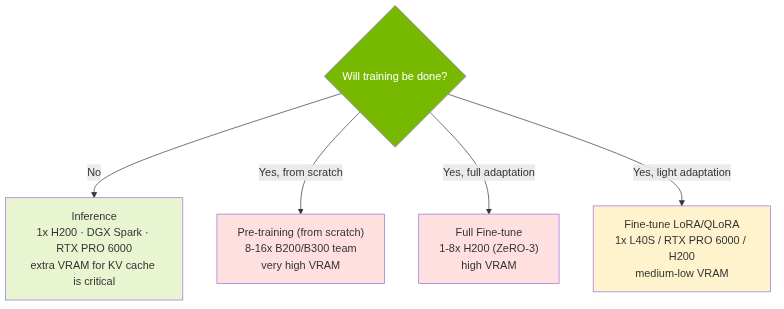
Figure: First decision: training or inference?
For most organizations, the starting point is inference — running a ready open model on your own server. Training/customization comes into play only when the model needs to be adapted to your own data, and it has four tiers:
| Pre-training (from scratch) | Full Fine-tune | Fine-tune (LoRA) | Fine-tune (QLoRA) | Inference | |
|---|---|---|---|---|---|
| VRAM requirement | Very high (~16× params) | High (~12–14× params) | Medium (~2–3× params) | Low (~0.6–1× params) | Model + KV cache |
| 7B model | 8× B200 (1 team) | 1× H200 (~85–100 GB) | 1× L40S / RTX PRO 6000 | 1× L40S | 1× L40S / RTX PRO 6000 |
| 70B model | 8–16× B300 (1–2 teams) | 4–8× H200 (ZeRO-3) | 2–4× H200 | 1× DGX Spark / 1× H200 | 1× H200 (INT8) / 1× DGX Spark (INT8) — for FP16, 2× H200 (see 4.8) |
| Duration | Weeks–months | Days–1 week | Hours | Hours | — |
| Data requirement | Trillions of tokens | Millions of examples | Thousands of examples | Thousands of examples | — |
| Cost | Very high | High | Medium | Low | Medium |
- Pre-training (from scratch): The heaviest scenario; only for institutions training their own base model. Requires a B200/B300 cluster. Note: The “8×/16×” figures in the table are not the actual compute requirement but the minimum sales unit of B200/B300 (an 8-GPU team — see 4.5/D). The actual VRAM requirement is roughly 16× the model size (FP16 weights + gradients + Adam optimizer states): 7B full training ≈ 120–150 GB, 70B ≈ 1 TB+ (plus activations). So 7B full training needs far less memory than a single 8-GPU team; even if the whole team is not used, this is the smallest sales unit.
- Full Fine-tune: Updates all parameters of a pre-trained model on your own data. VRAM requirement is close to pre-training (~12–14× params — slightly lower thanks to gradient checkpointing and typically shorter sequences), but duration and data are far less. Suited for deep domain adaptation (specialized fields such as Turkish, medical, legal); comes into play when LoRA is insufficient. Risk — catastrophic forgetting: Updating all parameters can degrade or overwrite the general capabilities learned during pre-training (other languages, general knowledge, reasoning). LoRA/QLoRA largely mitigates this risk — base model weights are kept frozen and only small adapter layers are trained; domain adaptation is added while general capabilities are preserved. In practice, most organizations should start with LoRA/QLoRA. When full fine-tuning is chosen, mitigate the risk with: a low learning rate, data mixing (domain data + general data together), regularization (KL/L2), and limiting the number of epochs. (Open-source tools: see 6.F.)
- LoRA / QLoRA fine-tune: The practical way to adapt an existing model to your own data. It does not train the whole model, only small additional layers. Memory accounting: In LoRA, base weights are frozen, so only FP16 weights (~2× params) + gradient-checkpointed activations + small adapter gradients/Adam states contribute → ~2–3× params; in QLoRA, base weights are quantized to 4-bit NF4 (~0.5× params), plus activations and small adapter overhead → ~0.6–1× params. Fine-tuning a 70B model even with a single DGX Spark is possible (with QLoRA — in FP16-based LoRA, the 70B weights alone are ~140 GB, so they do not fit in 128 GB). (Open-source tools: see 6.F.)
- Inference: Just running the model. Here, the extra VRAM allocated for KV cache is critical (see 4.3); as the number of concurrent users grows, this load grows.
4.3. The decisive metric: VRAM (and total memory budget)
In local LLM, the single hard constraint is VRAM (graphics card memory). If the model weights + KV cache do not fit in GPU memory, it either spills to system RAM (~10x slowdown) or the model does not run at all.
Rule of thumb (weights only):
- FP16 (16-bit): ~2 GB VRAM / billion parameters
- 8-bit (Q8): half of that (~1 GB / billion)
- 4-bit (Q4, e.g. Q4_K_M): a quarter (~0.5 GB / billion). Q4_K_M is considered the optimal quality/memory balance because it retains ~92–95% of full precision while reducing memory ~4×.
Approximate VRAM by model size (weights; add KV cache + headroom on top):
| Model | FP16 | 8-bit | 4-bit (Q4_K_M) |
|---|---|---|---|
| 7B / 8B | ~14–16 GB | ~8 GB | ~5 GB |
| 14B | ~28 GB | ~15 GB | ~9–10 GB |
| 32B | ~64 GB | ~34 GB | ~18–20 GB |
| 70B | ~140 GB | ~70 GB | ~38–48 GB |
KV cache / context length impact (often overlooked). KV cache grows linearly with context length and the number of concurrent requests; for long contexts it can exceed even the model weights. Example: Llama 3.1 70B, a single request with 128K context, can alone consume ~40 GB of KV cache — and this value already assumes the model uses GQA (Grouped-Query Attention); a classic (MHA) architecture without GQA would require ~8× more for the same scenario. Mitigation: quantizing the KV cache to FP8/INT8 roughly halves the memory.
Total VRAM budget. The real requirement is not just the weights:
Total VRAM = Model Weights + KV Cache + Activations + Overhead
| Component | Calculation | Example |
|---|---|---|
| Model weights | parameters × bytes/param | 7B FP16 = 14 GB · 70B FP16 = 140 GB |
| Max context (max_len) | directly determines KV cache size | 4K → 128K tokens = ~32× KV cache difference |
| KV cache | 2 × layers × kv_heads × head_dim × max_len × batch × 2 bytes | 70B (GQA, 8 KV head), 4096 tokens, batch 32 ≈ 20–40 GB |
| Activations | batch × max_len × hidden_dim × layers | Large in training, small in inference |
| Overhead | ~10–20% extra | Fragmentation, temporary buffers |
Formula note: In GQA models,
kv_headsis a small fraction of the total attention head count (e.g. Llama 3.1 70B: 64 heads → 8 KV head); the 20–40 GB example in the table is therefore low. In a classic (MHA) architecture without GQA,kv_heads = number of heads, and the same scenario requires ~8× more memory.
Rule: Always leave ~20% extra VRAM headroom. To simplify the calculation, you can use OpenZeka’s free tool: Cordatus VRAM Calculator — https://app.cordatus.ai/#/vram-calculator
4.4. How inference works and quality-of-service metrics
Two-stage inference — why are there two separate bottlenecks? An LLM request is processed in two stages:
- Prefill (prompt processing): All tokens in the input prompt are processed at once (in parallel); heavy matrix multiplications dominate → compute-bound (FLOPS-dependent). This stage determines TTFT — a long prompt = long TTFT.
- Decode (token generation): The response is generated token by token, sequentially; since each token depends on the previous one (autoregressive), it cannot be parallelized within a single request. At each step, all model weights are re-read from memory, but the compute is relatively small → memory-bound (memory-bandwidth-dependent). This stage determines TPS. Generation continues until an EOS (end-of-sequence) token is produced or the maximum token limit is reached.
This is why two different hardware properties matter: FLOPS for prefill/TTFT and memory bandwidth for decode/TPS. Although decode does not parallelize within a single request, batching distributes weight reads across many requests, increasing total throughput.
Hardware selection is shaped not only by “does the model fit” but also by “what user experience are we targeting.” Four key metrics:
- TTFT (Time to First Token): How long after the user submits the prompt does the first token arrive? Compute-bound — depends on FLOPS.
- TPS (Tokens Per Second): How many tokens are generated per second? Directly affects user experience. Memory-bound — depends on memory bandwidth.
- Throughput: How many requests are processed per unit time? Increases as batch grows.
- Batch size — the fundamental trade-off: High batch → high throughput but high latency; low batch → low latency but low throughput. Finding the optimal point is critical.
Practical takeaway: if you want fast single-user responses, high bandwidth (TPS) and FLOPS (TTFT) matter; if you want multi-user high throughput, you need to scale the batch and therefore VRAM (KV cache).
Techniques that accelerate the system (2026). Various software-layer methods exist to speed up these two stages; most are supported by vLLM / SGLang / TensorRT-LLM and generally kick in without changing the model:
- Speculative decoding: A small “draft” model proposes multiple tokens, and the large model verifies them in a single pass → 2–3× speedup in decode. The current strongest approach is EAGLE-3 / EAGLE 3.1 (a lightweight prediction head attached to the model’s inner layers, which does not require a separate draft model) and its parallel variant P-EAGLE.
- MTP (Multi-Token Prediction): The model predicts multiple tokens in a single step (e.g. DeepSeek architecture); used as a draft both in training and speculative decoding.
- Disaggregated prefill (prefill/decode separation): Distributes compute-bound prefill and memory-bound decode across separate GPU pools; each stage scales according to its own bottleneck, improving latency and throughput together (e.g. NVIDIA Dynamo).
- Continuous / in-flight batching: Dynamically adds and removes requests from the batch, keeping the GPU busy → high throughput.
- Chunked prefill & prefix caching: Splits long prefill and interleaves it with decode to lower TTFT; KV cache is reused for common prefixes (system prompt) (PagedAttention / RadixAttention — see 6.A).
- KV cache quantization (FP8/INT8): Reduces the memory load of decode (see 4.3).
With the right inference engine and configuration, these techniques can produce a 2–4× speed/throughput difference in production setups — software configuration matters as much as hardware.
4.5. Hardware classes (OpenZeka catalog)
We have limited the hardware recommendations in this guide to the NVIDIA products we offer as OpenZeka. We do not carry consumer GeForce cards (RTX 3090/4090/5090); instead, we provide professional workstations (RTX PRO Blackwell), data center GPUs, DGX systems, and Jetson edge modules. The decisive metric is again VRAM; the classes below are organized by VRAM and use case.
Why don’t we recommend consumer (gaming) GPUs? An RTX 4090/5090 certainly runs LLMs at the hobby/individual level; however, for enterprise, production, and 24/7 use, professional/data-center class is necessary for these concrete reasons:
- Low VRAM ceiling. The top consumer card (RTX 5090) stays at ~32 GB; insufficient for large models, long contexts, and KV cache. RTX PRO 6000 offers 96 GB and H200 offers 141 GB.
- No ECC memory. Consumer cards lack error-correcting (ECC) memory; there is a risk of silent memory errors during long-term/continuous operation. Professional and data center cards are ECC-equipped.
- Driver/license restriction. NVIDIA’s GeForce driver license restricts use in data centers; enterprise/DC deployment officially requires professional or data center cards.
- Limited multi-GPU scaling. NVLink has been removed from new consumer cards; high-speed inter-GPU links and server density are exclusive to the professional/DC series (see 4.6).
- Cooling & form factor. Consumer cards are not suited to server airflow and are not designed for sustained full load; data center cards work with passive cooling integrated into the server chassis (see 4.9).
- Warranty & sustainability. Professional cards come with enterprise warranty, long lifetime, and stable driver support; consumer cards do not offer these guarantees for production workloads.
In short: consumer cards “work,” but for a reliable, scalable, and compliant enterprise local-LLM infrastructure, professional/data center class is the right choice. The OpenZeka catalog is therefore limited to these classes.
Pricing note: These products are generally offered on a quote/project basis and prices vary; we deliberately do not list prices in this guide. For current pricing and availability, please contact us. The power (W) figures below are NVIDIA reference TDPs.
A) Jetson — edge / embedded / robotics local AI. For running small/medium models in the field or on-device, without requiring internet. Uses unified memory (CPU+GPU share the same pool).
- Jetson Orin Nano (4 GB / 8 GB) — entry-level; 1–4B-class small models, vision/speech assistants. Very low power.
- Jetson AGX Orin (64 GB) — serious work at the edge; with 64 GB unified, medium-sized models and multimodal workloads.
- Jetson AGX Thor / T5000 (128 GB class, Blackwell generation) — next-generation physical-AI/robotics flagship; large models and concurrent workloads at the edge. The “highest memory” option on the edge side.
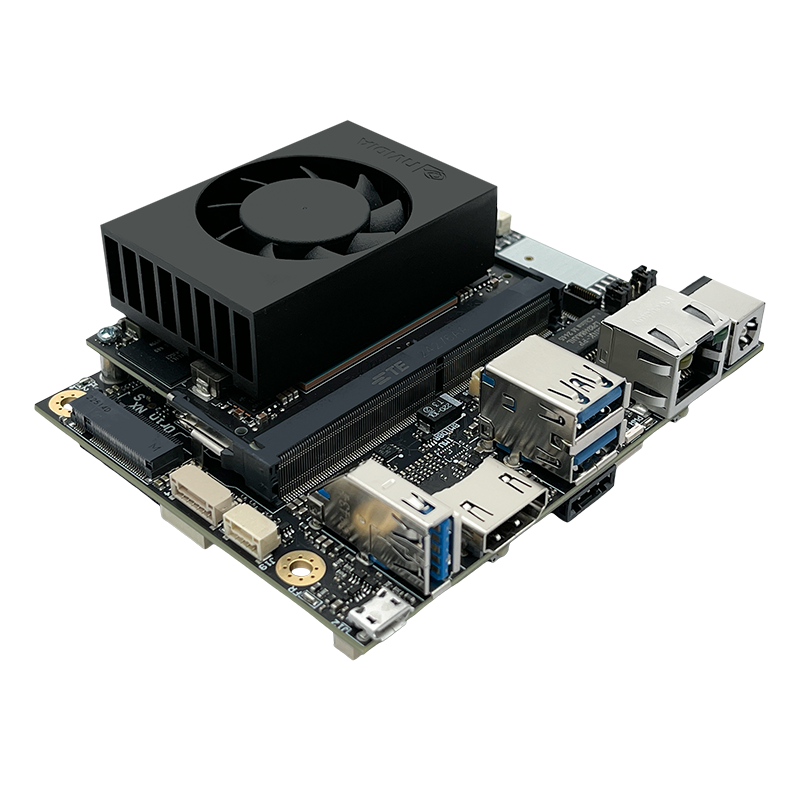
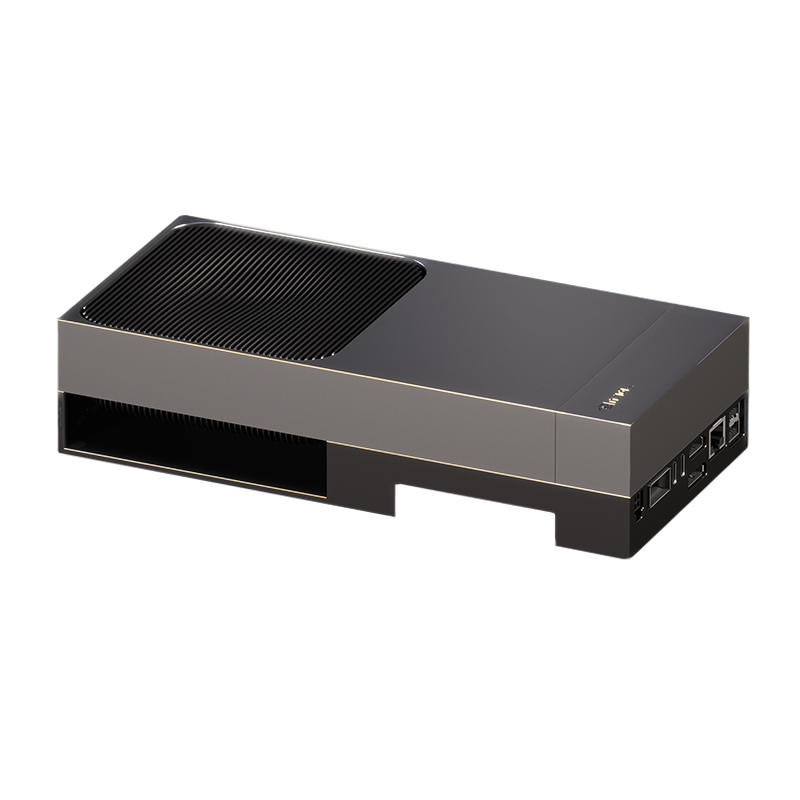
Jetson Orin Nano AI kit and Jetson AGX Thor Developer Kit (Image: OpenZeka)
B) RTX PRO Blackwell — workstation / server GPU (the main class for local LLM). ECC GDDR7, fits in a desktop workstation or server. This series replaces the consumer cards.
- RTX PRO 2000 Blackwell — 16 GB. Entry; comfortably 7B–14B (Q4). Very low power (~70 W), small form factor friendly.
- RTX PRO 4000 Blackwell — 24 GB (and an SFF/compact variant). Optimal entry: 14B comfortably, 32B Q4. ~140 W.
- RTX PRO 4500 Blackwell — 32 GB. Comfortably runs 32B; 70B does not fit on this card (see PRO 6000). ~200 W.
- RTX PRO 5000 Blackwell — 48 GB. 32B comfortably with long context; 70B in Q4 only with short context, at the limit (70B Q4 ≈ 38–48 GB — see 4.3; for comfortable 70B, use PRO 6000). ~300 W.
- RTX PRO 6000 Blackwell — 96 GB (three editions: Workstation, Max-Q Workstation, Server). On a single card, 70B in FP16/8-bit or very large contexts. Workstation/Server ~600 W; Max-Q ~300 W is the efficient choice for power/heat-constrained environments. The “single-card” flagship for local LLM.
As a ready workstation (OpenZeka): We provide these GPUs not only as bare cards but also as pre-installed and tested complete workstation systems (RTX PRO 4000 / 4500 / 5000 / 6000 Workstation and Max-Q). The systems ship with an Intel Core i9-14900KF-class CPU; Ubuntu + optimized NVIDIA software stack pre-installed, having passed performance/temperature tests, and delivered with a 2-year warranty — meaning “works out of the box” for local LLM. Details: openzeka.com/is-istasyonlari.
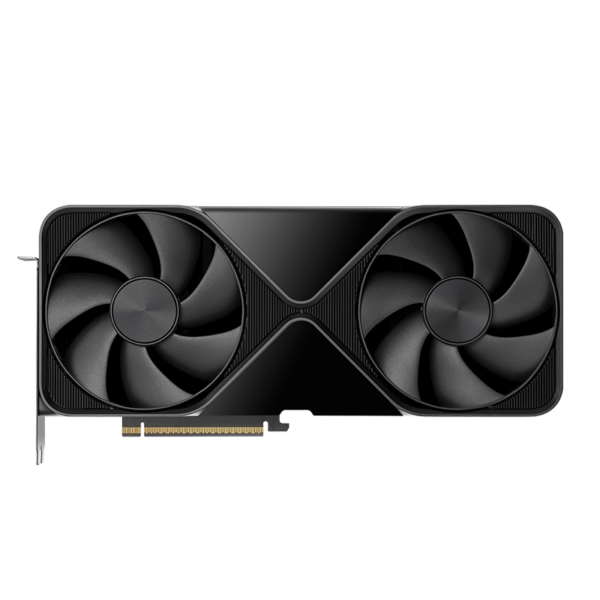
NVIDIA RTX PRO 6000 Blackwell Workstation Edition — 96 GB (Image: OpenZeka)
C) Data center GPUs (single / few) — high-volume, multi-user production service. Passively cooled, server-mounted cards; for many concurrent requests with vLLM/TensorRT-LLM. Unlike B200/B300, they can be sold individually (or 2–8 per server).
- NVIDIA L4 — 24 GB. Low-power (~72 W) inference card; efficient base for small/medium model serving.
- NVIDIA L40 / L40S — 48 GB. Versatile inference + fine-tuning; serves mid-size models with high throughput (a single card is not enough for 70B — see “common mistakes”, Section 8; 70B-class requires H100/H200 or 2× cards).
- NVIDIA H100 NVL — 94 GB and H200 NVL — 141 GB. The highest tier sold as single cards; large MoE models, long context, intense concurrency. The 141 GB of the H200 gives the highest model capacity on a single card.
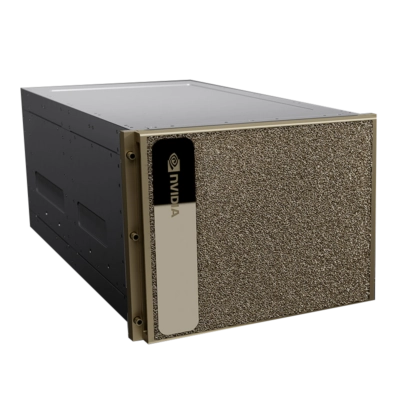
Data-center-class NVIDIA DGX/HGX server infrastructure (Image: OpenZeka)
D) Top-tier Blackwell — turnkey data center systems (HGX / DGX, 8-GPU team). For full training and high-traffic (500+ concurrent users) inference. This class is not sold as single cards; it comes as an 8-GPU, pre-installed–pre-wired–pre-cooled server/rack — budget and infrastructure must be planned accordingly.
- NVIDIA B200 — 192 GB HBM3e, 8 TB/s. Blackwell generation; cluster training and high throughput.
- NVIDIA B300 — 288 GB HBM3e, 8 TB/s. Blackwell Ultra; for training and serving the largest models (405B+) with NVFP4.
- Turnkey systems — NVIDIA DGX B200 / DGX B300. “AI Factory”-class servers from NVIDIA containing 8 of the above GPUs; the highest tier for enterprise-scale training + inference. (DGX = NVIDIA’s turnkey system; HGX = the form in which the same 8-GPU block is integrated into OEM servers.)
E) DGX Spark — desktop “AI mini PC” (a class of its own).
Important — mind the name confusion: Although it carries “DGX” in its name, DGX Spark is not the same family/class as the rack-mounted DGX/HGX servers in (D) above. It is a plug-in, standalone, palm-sized desktop mini PC. The “DGX” here is just NVIDIA’s desktop AI-device brand; the hardware class, memory bandwidth, and use case are entirely different from B200/B300 data center systems.
- NVIDIA DGX Spark (GB10 Grace-Blackwell) — 128 GB unified memory, 1 PetaFLOP AI, only 240 W, 150×150×50 mm / 1.2 kg. A desktop “AI supercomputer”; fits models up to ~200B in memory, can fine-tune 70B. Key constraint: memory bandwidth is relatively low (~273 GB/s) → single-stream token generation is slower than running the same model on an H200. Its real strength: fitting very large models in memory compactly and at low power, for local development/test and gradual growth. No 8-GPU team requirement — can be purchased and scaled one by one, like a mini PC. Scales switch-less with QSFP cables:
- 1× Spark — 128 GB, 70B fine-tune / 200B inference, 3–5 concurrent users, local testing.
- 2× Spark (ConnectX-7 QSFP, 200 Gbps direct connection) — 256 GB, 405B inference, mid-scale team.
- 3× Spark (ring topology) — 384 GB, 405B+ fine-tune / high throughput, no switch required.
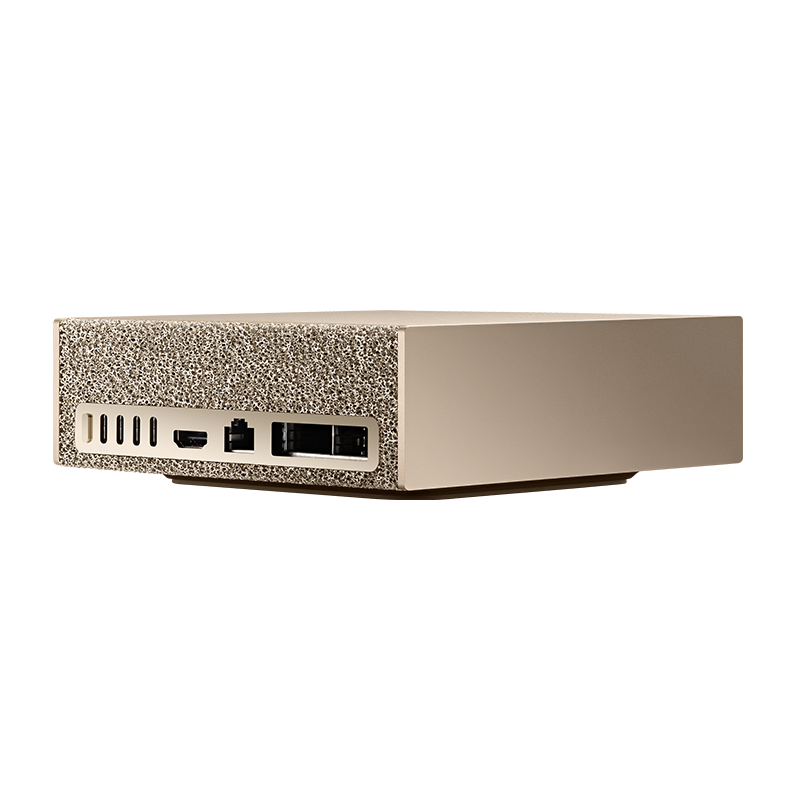
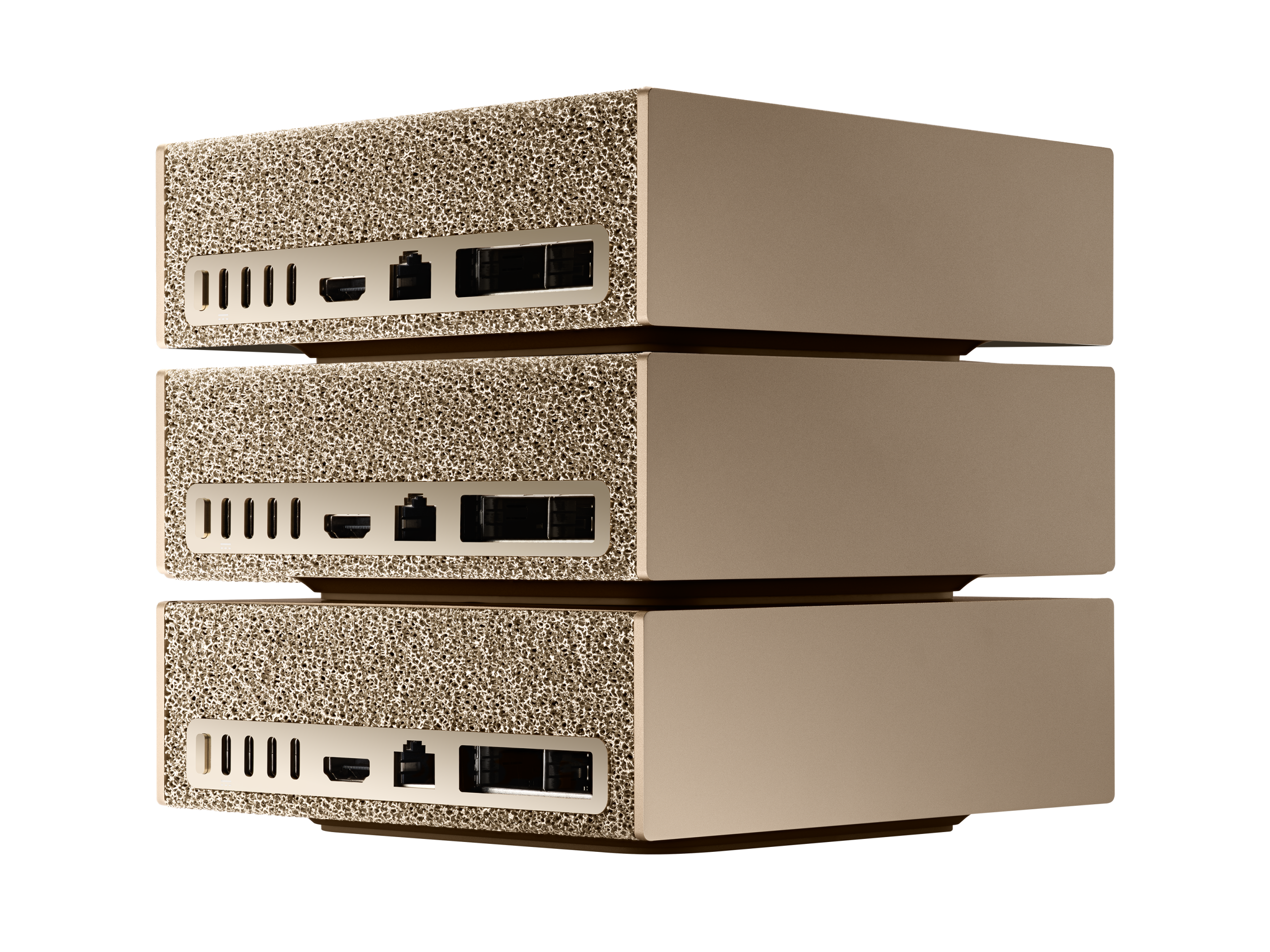
NVIDIA DGX Spark (128 GB, 240 W) and 3× ring topology yielding a 384 GB pool (Image: OpenZeka)
GPU comparison matrix (2026). OpenZeka’s leading LLM options:
| Model | Architecture | VRAM | FP16/BF16 (sparse) | FP8 (sparse) | FP4 (sparse) | Memory BW | Sales unit |
|---|---|---|---|---|---|---|---|
| B300 288GB | Blackwell Ultra | 288 GB HBM3e | 4,500 TFLOPS | 9,000 TFLOPS | 30,000 TFLOPS (15 PFLOPS dense) | 8 TB/s | 8-GPU team |
| B200 192GB | Blackwell | 192 GB HBM3e | 4,500 TFLOPS | 9,000 TFLOPS | 18,000 TFLOPS | 8 TB/s | 8-GPU team |
| H200 141GB | Hopper | 141 GB HBM3e | 1,979 TFLOPS | 3,958 TFLOPS | — | 4.8 TB/s | Single (2–8/server) |
| DGX Spark (GB10) | Grace Blackwell | 128 GB LPDDR5x (unified) | — | — | 1,000 AI TOPS | 273 GB/s | Single (desktop) |
| RTX PRO 6000 Blackwell | Blackwell | 96 GB GDDR7 | ~1,000 TFLOPS | ~2,000 TFLOPS | 4,000 AI TOPS | 1.79 TB/s | Single (workstation) |
| L40S 48GB | Ada Lovelace | 48 GB GDDR6 | 362 TFLOPS | 733 TFLOPS | — | 864 GB/s | Single (server) |
Values are from NVIDIA’s official datasheets (2:4 sparsity / “with sparsity”). The B300’s real leap over the B200 is in memory (192→288 GB) and NVFP4 (FP4 ~67% higher: 15 PFLOPS dense / ~30,000 TFLOPS sparse); FP8/FP16 are similar to the B200, and bandwidth is 8 TB/s on both. For the RTX PRO 6000, NVIDIA quotes “up to 4 PFLOPS FP4 (4,000 AI TOPS), 2 PFLOPS FP8, 1 PFLOP FP16”.
DGX Spark — example run rates (decode benchmark with vLLM). Thanks to unified memory, huge models run on a standalone desktop device:
| Model | Size | Quantization | Configuration | Tok/s (decode) |
|---|---|---|---|---|
| gpt-oss-120b | 120B | MXFP4 | 1× DGX Spark | 54.72 |
| gpt-oss-120b | 120B | MXFP4 | 2× DGX Spark | 101.36 |
| gpt-oss-120b | 120B | MXFP4 | 4× DGX Spark | 106.31 |
| MiniMax-M2.7 | 229B | NVFP4 | 2× DGX Spark | 26.00 |
| Qwen3.5-397B-A17B | 397B | INT4 AutoRound | 3× DGX Spark (ring) | 17.05 |
Previous-generation professional cards (RTX 6000 Ada 48 GB, RTX A6000 48 GB) are also in the catalog; they are 48 GB alternatives for budget/availability situations, but new purchases should prefer the Blackwell generation (RTX PRO 5000/6000).
4.6. Multi-GPU
When a single card’s VRAM is insufficient for the target model, multiple cards are pooled (e.g. 2× RTX PRO 5000 = 96 GB, or 2× RTX PRO 6000 = 192 GB). The rationale: running 70B+ and large MoE models with high precision / long context. Professional/data center cards are designed for multi-GPU scaling; the workload is distributed via tensor parallelism (each layer is split across cards, requires high bandwidth) or pipeline parallelism (layers are distributed across cards, light inter-card traffic). vLLM and TensorRT-LLM support both. In multi-node setups, InfiniBand/Ethernet bandwidth and PCIe bottlenecks must not be overlooked.
4.7. CPU + RAM only
Suitable for entry, small/quantized models, and batch/non-interactive work (e.g. document summarization); not for fluid chat. The bottleneck is not compute but memory bandwidth. A typical 8-core desktop CPU achieves ~5–15 tok/s on a 7B model; large models drop to single digits. A model that fits in VRAM is roughly ~10× faster than one spilled to RAM. llama.cpp can keep some layers on the GPU and offload the rest to RAM — good as a short-term solution, not for production speed.
4.8. Scenario → hardware mapping
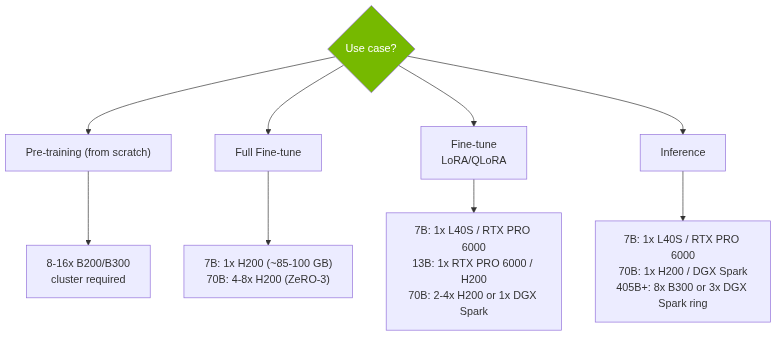
Figure: GPU selection decision tree
General mapping (edge to enterprise):
| Need | Target VRAM | OpenZeka hardware |
|---|---|---|
| Edge / embedded / robotics | unified 8–128 GB | Jetson Orin Nano (8 GB) → AGX Orin (64 GB) → AGX Thor / T5000 (128 GB) |
| Entry workstation (7–14B) | 16–24 GB | RTX PRO 2000 (16 GB) or RTX PRO 4000 (24 GB) |
| Mid (14–32B comfortably) | 32–48 GB | RTX PRO 4500 (32 GB) or RTX PRO 5000 (48 GB) |
| High / single-card 70B | 96 GB | RTX PRO 6000 (96 GB) — Max-Q edition if power-constrained |
| Multi-user production service | 24–141 GB | L4 / L40S → H100 NVL (94 GB) → H200 NVL (141 GB) |
| Very large model / turnkey | 128 GB+ | DGX Spark (128 GB) / 2–3× ring, at enterprise scale DGX B300 |
| Fine-tune (LoRA/QLoRA) | low–medium | 7B: 1× L40S / RTX PRO 6000 · 70B: 1× DGX Spark (QLoRA) / 2–4× H200 (LoRA) |
| Full Fine-tune | ~12–14× params | 7B: 1× H200 (~85–100 GB) · 70B: 4–8× H200 (ZeRO-3, ~1 TB) |
| Pre-training (from scratch) | ~16× params | 8× B200 / 8–16× B300 (8-GPU team — see 4.5/D) |
Inference scenarios (model size × user capacity):
| Model (precision) | Min VRAM | Recommended GPU | Concurrent capacity |
|---|---|---|---|
| 7B (FP16) | ~14 GB | 1× L40S or RTX PRO 6000 | 50+ |
| 13B (FP16) | ~26 GB | 1× RTX PRO 6000 96GB | 30+ |
| 70B (FP16) | ~140 GB | 2× H200 (a single H200 leaves no room for KV cache + 20% headroom) | 20–100 |
| 70B (INT8) | ~70 GB | 1× H200 · 1× DGX Spark | 30–100 (H200) · ~3–5 (Spark) |
| 405B (FP16) | ~810 GB | 8× B300 | 10–50 |
| 405B (INT4) | ~200–230 GB | 3× DGX Spark (ring, 384 GB) | ~3–10 (ring) |
| 70B inference (high traffic, 500+) | — | 8× B200 (1 team) | cluster required for throughput |
Note: The “Min VRAM” column is the raw memory footprint of the model at the given precision; KV cache + ~20% headroom is added on top (see 4.3) — this is why 70B FP16 does not fit on a single 141 GB card; 2× H200 is required. On DGX Spark (128 GB) and ring configurations, very large models run quantized (INT8/INT4). Because DGX Spark’s memory bandwidth is relatively low (273 GB/s), it is suitable for single / few concurrent users (~3–5); high concurrency requires H200/B-series.
4.9. Operating costs and Total Cost of Ownership (TCO)
- Power (reference TDP): RTX PRO 2000 ≈ 70 W · PRO 4000 ≈ 140 W · PRO 4500 ≈ 200 W · PRO 5000 ≈ 300 W · PRO 6000 Workstation/Server ≈ 600 W (Max-Q ≈ 300 W) · L4 ≈ 72 W · L40S ≈ 350 W · H200 NVL ≈ 600 W · DGX Spark only 240 W · 8× B200 server ~15 kW. Jetson modules are in the tens of watts, very low.
- For office environments with power/heat constraints, Max-Q editions, low-TDP cards (PRO 2000/4000, L4), and DGX Spark offer a clear advantage.
- Cooling: Workstation cards come with their own fans; data center cards (L40S, H100/H200 NVL) are passive and work only in a server/chassis with proper airflow — they cannot be installed in a desktop chassis. For multi-GPU and 24/7 production, server-class cooling is mandatory.
- TCO — purchase price ≠ total cost. The GPU purchase price is only 30–40% of the total cost of ownership; the remaining 60–70% is electricity, cooling, networking, maintenance, data center, and personnel. In large clusters, cooling costs can approach electricity costs; for multi-node, InfiniBand switch + cabling costs must also be factored in. A properly scaled, low-power solution (e.g. DGX Spark) often offers a lower TCO.
5. Model Selection
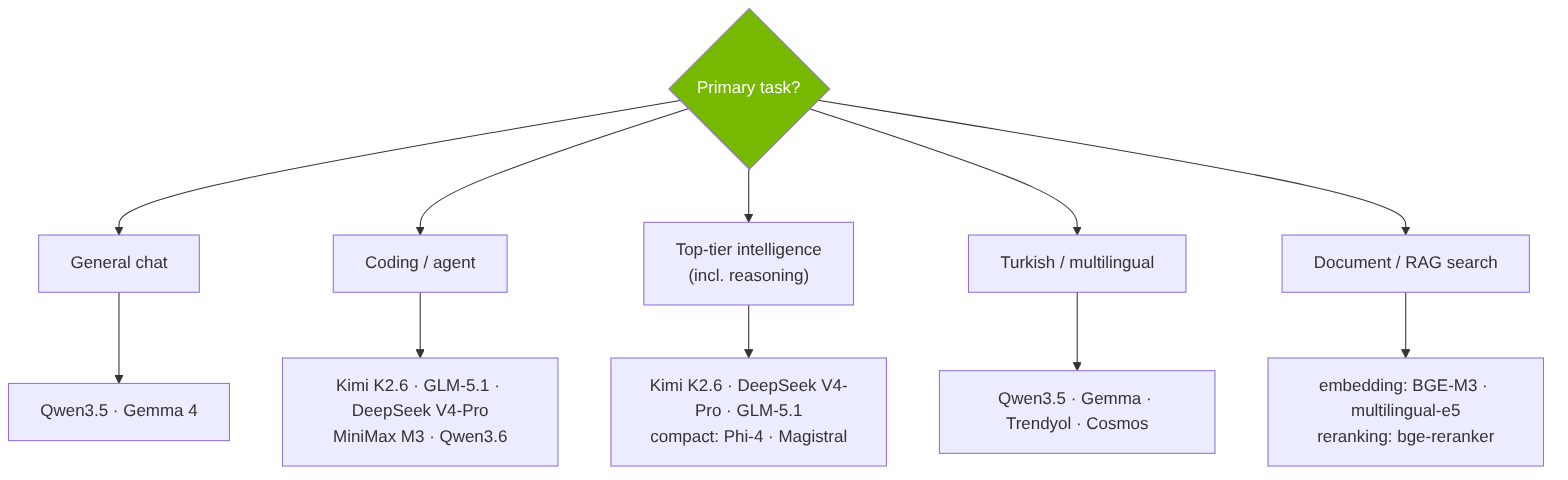
Figure: Model selection by task
Size–cost balance: for most local workloads, 7–14B dense or ~30B MoE (~3B active) models are the optimal balance; the most demanding tasks require 70B+ / large MoE.
5.1. What can you do with a local LLM? (inference use cases)
Before selecting a model, “what task will I do?” must be clear — the task determines both the model and the hardware. For most organizations, the starting point is inference, not training (see 4.2) and RAG is only one of these. It is practical to group the use cases into two:
Interactive (low latency matters — TPS/TTFT decisive):
- Chat / assistant — general Q&A, enterprise/personal assistant
- RAG / document Q&A — with your own documents (only one of these)
- Code assistance — IDE assistant, code generation/explanation/review, test generation
- Agent & automation (agentic) — tool calling, email triage, calendar, multi-step workflows
- Translation — translating classified documents locally without exposing them
Batch / non-interactive (batch — latency irrelevant; small/cheap hardware suffices, see 4.7):
- Summarization — meetings, contracts, long reports, email piles
- Information extraction — invoice/contract/form → structured JSON, NER
- Classification / routing — request triage, sentiment analysis, content moderation, PII detection
- Semantic search / recommendation / clustering — with embedding models
- Synthetic / labeled data generation — data preparation for fine-tuning
- Multimodal — OCR’d document analysis, visual Q&A, audio transcription + LLM
- Guardrail / auditing — auditing another model’s output, PII masking
Practical takeaway: Because batch jobs are latency-insensitive, they reduce hardware requirements — the same organization can run archive summarization on a small card and live chat on a large card. Your task profile jointly determines the hardware class in §4 and the model choice below.
5.2. Model selection criteria
The right model is not “the one with the highest benchmark score” but the one best suited to your task + hardware + constraints. Weigh the criteria below by your task priorities:
| Criterion | Question to ask |
|---|---|
| Task fit | Chat, code, reasoning, or inference? |
| Size / VRAM budget | Does it fit the hardware? In MoE, total parameters determine memory (all experts are loaded into VRAM); active parameters determine only speed |
| Context length | How many tokens needed? (Determines KV cache load — see 4.3) |
| Turkish / language performance | Not the general score, but Turkish benchmarks (see 5.6) |
| License | Is commercial use allowed? (see 5.7) |
| Architecture | Dense vs MoE — speed/memory trade-off |
| Quantizability | Is Q4/AWQ quality loss acceptable? Are GGUF/AWQ available? |
| Tool-calling / JSON reliability | Critical for agents & structured output (small models struggle) |
| Multimodality | Are vision/audio needed? |
| Fine-tunability | Is the base model + ecosystem (Unsloth/Axolotl) available? |
| Ecosystem / maintenance | Are ready quants, variants, and active development available? |
Criteria are weighted by task: in a code assistant, tool-calling + SWE-bench stand out; in government/legal document processing, Turkish performance + license + citation accuracy are decisive. Validate the choice with your own usage, not a single “leader model” (see 5.9).
5.3. Current open-weight model families (mid-2026)
Note: In 2026, momentum has clearly shifted to Chinese open-weight labs (Qwen, DeepSeek, GLM, Kimi, MiniMax). Most new models use the MoE (Mixture-of-Experts) architecture: total parameters are large, but only a small “active” portion runs at each step → large-model quality at small-model operating cost.
- Qwen (Alibaba) — the most active family. Qwen3-235B-A22B (235B total / 22B active, Apache 2.0). In February 2026, the Qwen3.5 series (flagship Qwen3.5-397B-A17B, ~1M context; plus 0.8B–27B dense and 35B-A3B / 122B-A10B MoE variants). The newer Qwen3.6-35B-A3B rivals the older 397B in coding. 100–200+ languages.
- DeepSeek — In April 2026, DeepSeek V4 (MIT): V4-Pro (1.6T / 49B active, 1M context) and V4-Flash (284B / 13B active). The older R1 reasoning model and distilled versions (1.5B–70B) remain very common.
- Llama (Meta) — the Llama 4 family: Scout (109B/17B active, 10M context), Maverick (~400B/17B active, 1M context). The largest “Behemoth” appears to have been practically shelved (not officially confirmed). License is restrictive (see 5.7).
- Google Gemma — Gemma 4: E2B (phone), E4B (edge), 12B, 26B-A4B (MoE), 31B dense. 140+ languages, multimodal (text+image) from 4B onward.
- Mistral — Mistral Large 3 (675B/41B active, multimodal) and Mistral Small 4 (Apache 2.0). The 24B Magistral reasoning model.
- Microsoft Phi — Phi-4 family (~14B reasoning models, MIT). Strong in reasoning per parameter, ideal for local.
- 2026 risers: GLM-5.1 (Zhipu/Z.ai) (~744B/40B active, MIT, strong agent/coding), Kimi K2.6 (Moonshot) (~1T/32B active, multimodal, among the best open models in coding), MiniMax M3 (June 2026; frontier coding + 1M context + multimodality together), MiMo V2.5 Pro (Xiaomi) (at the top of open-weight intelligence). NVIDIA’s open model Nemotron 3 and Gemma 4 are the strongest non-Chinese open options; OpenAI’s open-weight gpt-oss series also runs locally.
5.4. Parameter size ↔ performance balance
- Small (1–4B): In 2026, genuinely useful — autocomplete, summarization, smart replies, simple Q&A, light code help. Runs on phones and 6 GB VRAM.
- 7–14B dense or ~30B MoE (~3B active): The optimal balance for most local workloads — chat, RAG, code assistance, agent tasks. MoEs like Qwen3.6-35B-A3B and Gemma 4 26B-A4B deliver near-large-model quality at small-model cost.
- 70B+ / large MoE: For the hardest reasoning, complex multi-step agent-coding, very long context, and the highest benchmark scores. Requires multi-GPU / serious VRAM.
5.5. Quantization
- Formats: GGUF (llama.cpp/Ollama/LM Studio; CPU+GPU; most common locally), GPTQ (GPU), AWQ (activation-aware, slightly better than GPTQ at 4-bit).
- Quality/bit: FP16 = full quality · 8-bit ≈ near-lossless · Q4_K_M ≈ ~92–95% of quality · AWQ 4-bit ≈ ~95%. At 4-bit, the loss is ~1–2% for most tasks.
- 2026 developments: imatrix (importance-matrix) quants improve quality at the same bit; Unsloth Dynamic 2.0 sets bits per layer; hardware-native MXFP4 for Blackwell; FP8 is common in server setups.
5.6. Selection by task (including Turkish)
- General chat: Qwen3/3.5 (multilingual, Apache 2.0), Gemma 4 (multimodal, edge-friendly).
- Coding/agent: Kimi K2.6, GLM-5.1, DeepSeek V4-Pro, MiniMax M3, Qwen3.6 (Qwen-Coder).
- Top-tier general intelligence (including reasoning): In 2026, reasoning is not a separate category. The Artificial Analysis Intelligence Index (v4.0; combines agent + coding + scientific reasoning + general capability, https://artificialanalysis.ai) shows that the same models lead in intelligence, coding, and reasoning at the open-weight top. Current open-weight leaders: Kimi K2.6, DeepSeek V4-Pro, GLM-5.1 (all three statistically tied), followed by MiMo V2.5 Pro (Xiaomi) and Qwen3.6. The strongest non-Chinese open models: Google Gemma 4 and NVIDIA Nemotron 3. (Note: Qwen3.7 Max/Plus are closed API models, not open-weight.) For compact/local reasoning, Phi-4 and Magistral 24B are strong per parameter.
- Turkish / multilingual: The best general multilingual open models are Qwen3/3.5 (200+ languages) and Gemma 3/4 (140+ languages). On TurkBench, Qwen3-235B-Inst scored 73.4 and Gemma-3-12B-TR 71.4 (large models consistently lead). Turkish-specific models: ytu-ce-cosmos Turkish-Llama-8b (YTÜ, Llama-3-based), Trendyol-LLM v4.1.0 (Qwen2.5-7B + 13B on Turkish tokens), CosmosGPT (355M–774M, Turkish-only), MODA (Qwen2.5-7B continued pre-training, 2026). Turkish benchmarks: TurkishMMLU, Cetvel, TurkBench.
- Embedding & reranking models for RAG: RAG quality depends on the embedding model as much as on the LLM — if the wrong chunk is retrieved, even the best model cannot answer correctly. Strong open options for multilingual/Turkish: BGE-M3, multilingual-e5, Jina embeddings v3, Nomic Embed; for reranking, the bge-reranker class. Embeddings also run locally (e.g. TEI); for Turkish-heavy work, choose multilingual/Turkish versions and validate on your own documents (see 5.9).
5.7. License (commercial use)
- Fully free (Apache 2.0 / MIT): Qwen3/3.5 (Apache 2.0), DeepSeek V4 & R1 (MIT), GLM-5.1 (MIT), Mistral open layers (Apache 2.0), Phi-4 (MIT). Kimi K2.6 “Modified MIT” (check the brand/attribution clause at very large scale).
- Restrictive: Llama 4 Community License — commercial use is free only for organizations under 700M monthly active users; EU-based users are excluded from multimodal/vision capabilities. Gemma is under Google’s own terms (permissive but not pure Apache).
- Safest foundations for commercial distribution in Turkey: Qwen (Apache 2.0) and DeepSeek/GLM (MIT). Turkish derivative models inherit the base model’s license — Trendyol v4.x → Qwen2.5, ytu-cosmos → Llama; check each model card separately.
5.8. Where do you compare models in 2026?
- The original Hugging Face Open LLM Leaderboard was archived (2025). It has been replaced by aggregator/arena sites.
- LMArena (formerly Chatbot Arena/LMSys) — Elo from blind A/B votes; the best signal for real-world preference.
- llm-stats.com — 300+ models; composite score (GPQA, SWE-Bench Verified, coding-arena, price).
- Artificial Analysis — Intelligence Index (v4.0) — a composite score combining agent + coding + scientific reasoning + general capability; ranks open-weight and closed models side by side. It is the most practical single-glance source for open model selection. https://artificialanalysis.ai
- Key benchmarks: for agent-coding, SWE-Bench Pro & Verified / Terminal-Bench; for reasoning/science, GPQA Diamond / Humanity’s Last Exam; older academic benchmarks (MMLU-Pro, AIME, MATH-500) have largely saturated and are now less discriminating; for Turkish, TurkishMMLU / Cetvel / TurkBench.
5.9. Build your own evaluation (benchmark) set
The general leaderboards in §5.8 are a good starting signal but do not reflect your reality: your language, your domain, your documents, and your chosen quantization yield different results; moreover, popular benchmarks carry a risk of data contamination (the model having seen the test questions during training). The most reliable decision is a small, organization-specific evaluation set.
- Data: Collect 50–200 representative examples from real usage (input + ideal output or acceptance criteria).
- Method (by task):
- Inference / classification → automatic scoring (exact-match / regex)
- Open-ended / chat → LLM-as-judge (with a larger model, rubric) + human side-by-side
- RAG → retrieval recall@k + citation/faithfulness accuracy
- Measure not only quality: on your own hardware, TPS/TTFT, concurrent capacity, PII leakage / unnecessary refusal rate.
- Process: compare candidates on the same set → also test quantization levels (Q4 vs Q8 quality loss) → re-run the same set as a regression test on model/version updates.
- Tools: lm-evaluation-harness, promptfoo, RAGAS / DeepEval for RAG, Langfuse for monitoring.
PoC loop: start small → measure on your own set → scale hardware and model as needs clarify. The “right model” decision is made with this loop, not with a marketing score.
6. Software Selection
It is healthiest to think of the software layer in seven categories: (A) inference engines (the backend that actually runs the model), (B) all-in-one desktop applications, (C) next-generation self-hosted AI workspaces, (D) classic web UIs and RAG solutions, (E) API gateways / routing (the layer in front of multi-model, multi-user setups), (F) fine-tune & training tools, and (G) coding assistants & agents.
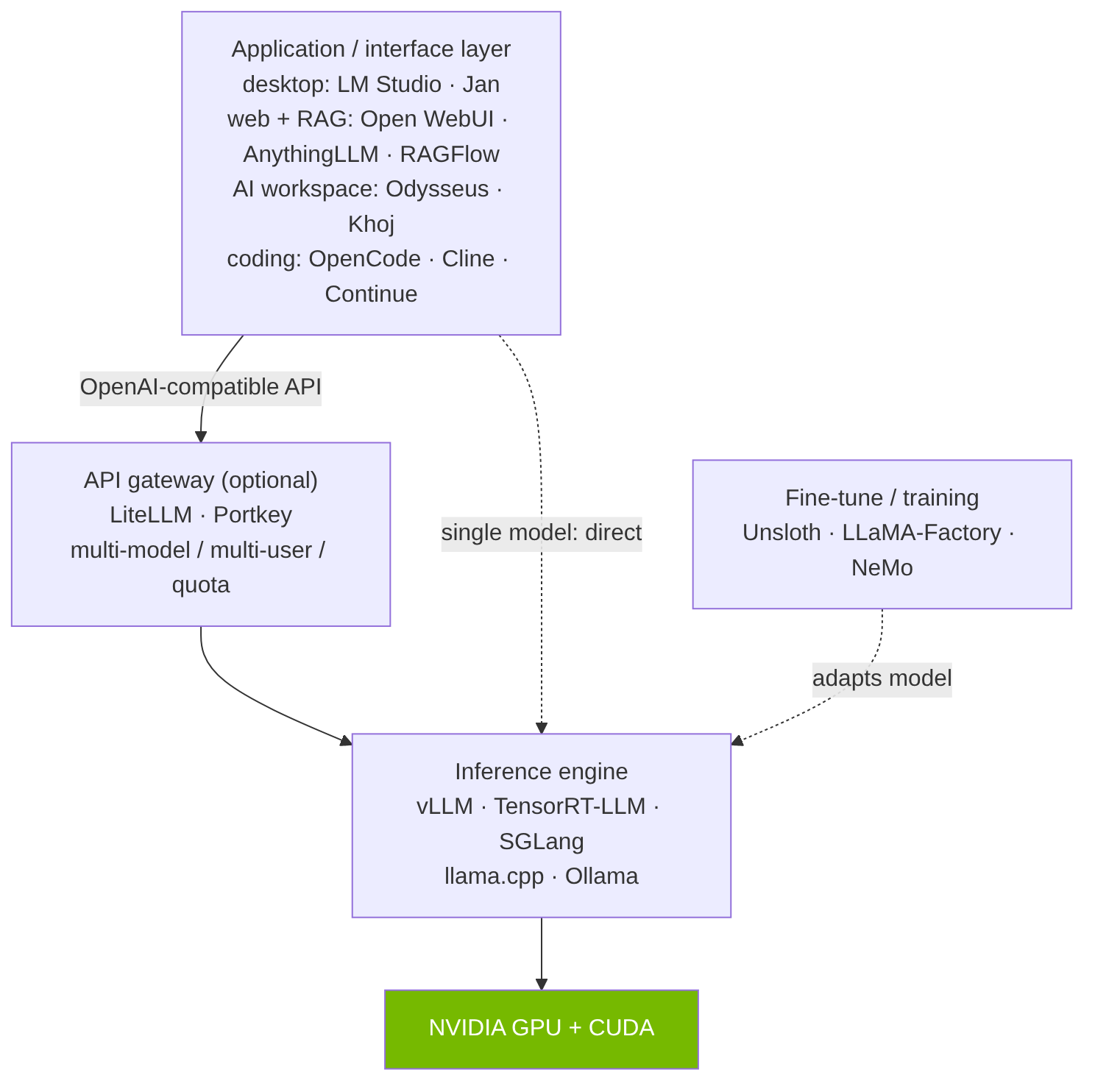
Figure: Software layers: UI → engine → hardware
Common ground — OpenAI-compatible API: llama.cpp (llama-server), Ollama, vLLM, SGLang, and LM Studio all offer an OpenAI-compatible endpoint. So the same client code (just changing
base_urlto localhost) works with all of them — a critical convenience for integration.
6.A. Inference engines (backend)
- llama.cpp — The foundation of the ecosystem. C/C++; native format GGUF (1.5-bit → 8-bit). 15+ backends including CUDA;
llama-serverprovides an OpenAI-compatible HTTP server. The widest hardware compatibility, runs on the most modest hardware. Many tools such as LM Studio, Ollama, and Jan build on it (GGUF) as their inference engine. (License: MIT · ~117k★ · ggml-org/llama.cpp) - Ollama — The easiest start (
ollama run <model>), with its own model library. 2026 change: Since July 2025 there is an official desktop app for macOS/Windows (chat GUI, file/image input); Linux remains CLI. 2026 releases added an agent/integration layer, faster GGUF loading, concurrent multi-session, and model publishing to the cloud. Both native REST and OpenAI-compatible API. Dozens of frontends (Open WebUI, AnythingLLM…) are built on top. (License: MIT · ~174k★ · ollama/ollama) - vLLM — High-throughput serving engine. PagedAttention pages the KV cache (memory waste <4%). ~24× throughput vs. naive HF, and 2–4× over Ollama at high concurrency. OpenAI-compatible server. For production / multi-user / high-concurrency GPU serving; not for desktop. (Nearly weekly releases; v0.22.1, June 2026.) (License: Apache-2.0 · ~83k★ · vllm-project/vllm)
- SGLang — A counterpart to vLLM. RadixAttention stores common prefixes (system prompt, multi-turn history) only once. Reported in production on 400,000+ GPUs at xAI/NVIDIA and others; in some tests ~29% higher throughput than vLLM on H100. Strong for agent / multi-turn / common-prompt scenarios. (License: Apache-2.0 · ~29k★ · sgl-project/sglang)
- TensorRT-LLM (NVIDIA) — NVIDIA’s own open-source, highest-performance inference engine, for NVIDIA GPUs only. It compiles the model into a TensorRT engine for a specific model+GPU+precision (fused kernels, optimized attention, aggressive quantization). Supports FP8, FP4, INT4-AWQ, INT8-SmoothQuant; includes in-flight batching, paged KV cache, speculative decoding. In published benchmarks it is typically ~15–30% ahead of vLLM in peak throughput/latency on H100-class cards. Cost: the compile step (engine build) and operational overhead are higher than vLLM, and adaptation to new models is slower. When: for production services that have fixed on NVIDIA hardware and want the last drop of performance. Overkill for single-user desktop; there, Ollama/llama.cpp, and for practical multi-user serving, vLLM/SGLang make more sense. (License: Apache-2.0 · ~14k★ · NVIDIA/TensorRT-LLM)
6.B. All-in-one desktop applications
- LM Studio — Polished (closed-source) desktop app: HF model browser, one-click download, chat GUI, and a local OpenAI-compatible server. Win/macOS/Linux. In 2026 it added continuous batching, MTP speculative decoding;
lmsCLI and a headlessllmsterfor server/CI. The best path for those who want both GUI and developer tool. (License: closed source · lmstudio.ai) - Jan — Open-source, ChatGPT-style, 100% offline-capable. Built-in model hub, cloud connectors, MCP support, OpenAI-compatible API at
localhost:1337. Win/macOS/Linux. The main open-source alternative to LM Studio. (v0.7.9, March 2026.) (License: Apache-2.0 · ~43k★ · janhq/jan) - Llamafile (Mozilla) — Packages the model + llama.cpp in a single double-clickable file, opening a chat in the browser. For absolute simplicity/portability. (License: Apache-2.0 · ~25k★ · Mozilla-Ocho/llamafile)
6.C. Next-generation self-hosted AI workspaces
This category is the real innovation of 2026. The difference is not “which chat UI is nicer”; it is whether agent + persistent memory + MCP + personal data integration (email/calendar/notes) come out of the box. The shift from “chat UI” → “AI workspace” is real — but classic UIs have not stood still either (see the honest assessment in 6.D).
- Odysseus (github.com/pewdiepie-archdaemon/odysseus) — The clearest example of this paradigm. Agent mode (shell, file operations, skill execution), MCP support, Cookbook (scans your hardware and suggests VRAM-aware models and downloads them — directly closes the “what can my hardware run?” gap), Deep Research, persistent memory & skills with ChromaDB, email triage (IMAP/SMTP), CalDAV calendar, notes/tasks, model comparison. Backend: vLLM, llama.cpp, Ollama (+ OpenRouter/OpenAI/Copilot). Docker compose or native Python. (License: AGPL-3.0 · ~71k★ · pewdiepie-archdaemon/odysseus), active. (Security note: due to broad shell/tool access, the project recommends protecting the deployment like an admin console — authentication enabled, not directly exposed to the internet, reverse proxy + HTTPS.)
- Khoj — An “AI second brain.” Semantic search + chat over personal documents (PDF, Markdown, Notion, Word, org-mode); custom agents, scheduled automations, deep research. An unusually broad access surface: browser, Obsidian, Emacs, desktop, mobile, WhatsApp. Self-host (Docker) / cloud / enterprise. Very active. (License: AGPL-3.0 · ~35k★ · khoj-ai/khoj)
- Hermes (Nous Research) — Hermes Agent, a self-improving autonomous agent: automatic skill creation after complex tasks, persistent memory, 40+ tools, MCP, cron scheduler, parallel sub-agents, multi-platform messaging (Telegram/Discord/Slack/WhatsApp/Signal). Hermes WebUI is a lightweight three-panel frontend. A fast-growing new project. (License: MIT · ~194k★ · NousResearch/hermes-agent) Important: model-endpoint-agnostic (not local-first); for local LLM, point it at an Ollama/vLLM custom endpoint.
6.D. Classic web UIs and RAG solutions
Classic / general web UIs:
- Open WebUI — The honest answer to “is it left behind?”: partly, but not as much as you think. The most popular self-hosted chat UI (~141k★, very active). It has added modern capabilities: MCP support (+registry), native Python tool calling, Pipelines plugin framework, local RAG across 9 vector DBs, web search across 15+ providers. The fair criticism: it is still fundamentally a chat frontend + RAG + plugins; it does not have a workspace identity with email triage, calendar, notes, a hardware-aware model cookbook, or a self-improving skill/memory loop. So it is not stagnant — just on the “general UI” track, not the “AI workspace” track. (License: Open WebUI License — BSD-3 + brand condition · ~142k★ · open-webui/open-webui)
- LibreChat — Multi-provider, no-code custom agents/assistants, MCP, secure sandboxed code interpreter, web search, code artifacts. The most permissive license among the large UIs; very active. (License: MIT · ~39k★ · danny-avila/LibreChat)
- LobeChat / LobeHub — Has explicitly repositioned toward the agent paradigm: Agent Builder, Agent Groups, scheduling for automated runs, editable “Personal Memory,” 10,000+ tool/MCP plugins. Proof that the “chat → workspace” shift is real even among the classics. (License: LobeHub Community License · ~79k★ · lobehub/lobe-chat)
- Cherry Studio — Desktop client (Electron; Win/macOS/Linux). Unified LLM access + local; MCP tool use, agents, 300+ ready assistants, pre-connected file-system/GitHub/web-search/memory MCP servers. Supports the Ollama local API. For the single-user desktop / bring-your-own-key crowd. (License: AGPL-3.0 · ~35k★ · CherryHQ/cherry-studio)
RAG-focused solutions (Q&A over your own documents):
- AnythingLLM — A custom ChatGPT over your documents; strong agent features: no-code agent builder, web browsing, cron-scheduled agent tasks, MCP. RAG with source citations; LanceDB + PGVector/Pinecone/Weaviate/Qdrant; multi-user. Local backends: Ollama, LM Studio, llama.cpp, LocalAI. Docker or desktop. Sits between RAG and workspace. (License: MIT · ~62k★ · Mintplex-Labs/anything-llm)
- OpenRAG-Local (CordatusAI) — ⭐ OpenZeka/Cordatus’s open-source contribution (github.com/CordatusAI/openrag-local). We forked Langflow’s OpenRAG project (
langflow-ai/openrag) and adapted it to run fully locally, releasing it as open source: it requires no cloud API keys, inference runs on your own GPU with sglang/vLLM (OpenAI-compatible), and embeddings are produced locally with TEI. You upload your documents and query them from a chat interface. Stack: Langflow (flow engine) + OpenSearch (vector store) + Docling (OCR’d document parsing) + SearXNG (local web search). It includes agentic RAG, re-ranking, and multi-agent orchestration; it deploys with a single Docker Compose command and supports multi-GPU device assignment. Its example configuration uses GLM-5.1-FP8 as the LLM — so it is fully compatible with the hardware (RTX PRO / DGX) and model (Apache/MIT) choices in this guide, letting you set up a completely local document-Q&A solution for free. (License: Apache-2.0 · CordatusAI/openrag-local — fork oflangflow-ai/openrag, young project.) - RAGFlow — A leading open RAG engine combining deep document understanding + agent capabilities. Strong on messy real-world documents (PDF/scans/slides/Excel); explainable chunking, traceable/grounded citations (anti-hallucination), agent workflows + code execution + MCP. Docker Compose (4+ cores, 16 GB RAM). The most-starred dedicated RAG engine; for serious/production document Q&A. (License: Apache-2.0 · ~82k★ · infiniflow/ragflow)
6.E. API gateways / routing (gateway & router)
This layer is the §6 intro’s “all OpenAI-compatible, single
base_url“ idea scaled to the enterprise: it puts multiple models/servers/providers behind a single OpenAI-compatible endpoint.
When is it needed? For single-user + single-model, it is not needed — the engine’s own endpoint suffices. But it comes into play for multiple teams, multiple models, more than one GPU server, local+cloud mix, or usage/quota billing (see Scenario C and G).
Architectural position: Applications / IDE → [Gateway] → vLLM · TensorRT-LLM · Ollama · llama.cpp endpoints
What it provides: virtual API keys (per-team isolation), budget + rate limiting (quotas), routing + load balancing + fallback (“cheap task → small model, hard task → large model”), cost/usage tracking, observability (Langfuse, etc.), caching, and guardrails.
Important requirement note: A gateway does no compute, it only proxies → it needs no GPU, CPU suffices, low resources. Typical setup: Docker + Postgres for state (keys/budget) + optional Redis (cache/rate-limit). So it is much lighter than the engine layer; it is not “another GPU box.”
- LiteLLM — The most common choice. Both a Python SDK and LiteLLM Proxy (gateway server): virtual keys, budget/limits, routing/fallback, cost tracking, Langfuse logging, Redis cache. For local, it connects directly to vLLM/Ollama endpoints. (License: MIT —
enterprise/directory under a separate commercial license · ~50k★ · BerriAI/litellm) - Portkey AI Gateway — Fast, open-source edge gateway; routing/fallback/cache/observability, self-hostable. (License: MIT · ~12k★ · Portkey-AI/gateway)
- Kong AI Gateway — For organizations already using Kong; not a separate project but a capability within Kong Gateway (multi-LLM routing). (License: Apache-2.0 · ~44k★ · Kong/kong)
- Envoy AI Gateway — Built on Envoy Gateway; a vendor-neutral access layer for K8s environments. (License: Apache-2.0 · ~2k★ · envoyproxy/ai-gateway)
- NVIDIA side (per the report): NIM microservices — containerized, OpenAI-compatible, optimized inference services (License: closed/proprietary; for production, NVIDIA AI Enterprise · docs.nvidia.com/nim); for scaled serving without setting up a separate gateway, vLLM production-stack with its own router (License: Apache-2.0 · ~2k★ · vllm-project/production-stack). For multi-GPU/multi-node model management (a “cluster manager” adjacent to the gateway), GPUStack (License: Apache-2.0 · ~5k★ · gpustack/gpustack).
6.F. Fine-tune & training tools (open source)
These tools put the four tiers in §4.2 (pre-training · full fine-tune · LoRA · QLoRA) into practice. Most organizations start with LoRA/QLoRA — possible even on a single-GPU workstation; full fine-tuning and from-scratch training require multi-GPU/multi-node. All run on NVIDIA CUDA. For hardware mapping, see 4.2 and Scenario F.
Easy entry — LoRA/QLoRA fine-tune (single / few GPUs):
- Unsloth — The fastest and lowest-VRAM LoRA/QLoRA; adapts large models on a single GPU. With Unsloth Studio, data → training → evaluation → export (LoRA/GGUF) is done in a no-code, local web UI in a single flow. (License: Apache-2.0 / AGPL-3.0 dual — the AGPL clause requires enterprise legal review · ~67k★ · unslothai/unsloth)
- LLaMA-Factory — No-code WebUI/CLI; fine-tunes the widest range of 100+ LLMs and VLMs. The most practical entry for teams. (License: Apache-2.0 · ~72k★ · hiyouga/LLaMA-Factory)
- Axolotl — YAML-config-driven, version-controlled, reproducible fine-tune pipelines; scales from single-GPU to multi-GPU. (License: Apache-2.0 · ~12k★ · axolotl-ai-cloud/axolotl)
Alignment / building blocks:
- Hugging Face TRL — Component library for alignment / post-training (SFT, DPO, GRPO/RLHF). (License: Apache-2.0 · ~19k★ · huggingface/trl)
- Hugging Face PEFT — The foundation of the LoRA/adapter engine; not standalone, it works as a dependency under tools like TRL/Axolotl. (License: Apache-2.0 · ~21k★ · huggingface/peft)
Serious / large-scale & distributed training (multi-GPU / DGX class):
- NVIDIA NeMo — NVIDIA-native end-to-end training framework; for DGX-class multi-GPU/multi-node. (License: Apache-2.0 · ~17k★ · NVIDIA-NeMo/NeMo)
- Megatron-LM — NVIDIA GPU-optimized library for large-scale from-scratch pretraining. (License: Apache-2.0 · ~17k★ · NVIDIA/Megatron-LM)
- DeepSpeed — Distributed training backend (ZeRO, CPU/NVMe offload); makes it possible to train models whose VRAM a single card cannot provide. (License: Apache-2.0 · ~43k★ · deepspeedai/DeepSpeed)
Choice: For fast adaptation on a single workstation, Unsloth or LLaMA-Factory; for version-controlled pipelines, Axolotl; for alignment, TRL; for DGX-class distributed training/pretraining, NeMo + Megatron + DeepSpeed. Always test the fine-tuned model on your own evaluation set (see 5.9).
6.G. Coding assistants & agents (open source)
All the tools below connect to a local LLM via an OpenAI-compatible / Ollama endpoint — so code assistants/agents are used without your code or repository leaving the machine, and without connecting to a closed cloud. Critical for enterprise and air-gapped environments. For code tasks, choose a model with tool-calling capability (see 5.2); Qwen-Coder / DeepSeek-Coder-class models match well.
Terminal agents:
- OpenCode — Terminal-native, the most popular open coding agent; 75+ providers + local endpoint support. (License: MIT · ~175k★ · sst/opencode)
- Aider — Git-aware terminal “pair programming”; mature and established. (License: Apache-2.0 · ~46k★ · Aider-AI/aider)
In-IDE (VS Code / JetBrains):
- Cline — VS Code/JetBrains autonomous coding agent; open Ollama/LM Studio/OpenAI-compatible support. (License: Apache-2.0 · ~63k★ · cline/cline)
- Continue — IDE assistant: chat + autocomplete + agent mode, fully configurable for local models. (License: Apache-2.0 · ~34k★ · continuedev/continue)
Broad software agent:
- OpenHands — Sandboxed, end-to-end software-engineering agent (formerly OpenDevin); connects to local vLLM/Ollama. (License: MIT · ~77k★ · All-Hands-AI/OpenHands)
Self-hosted autocomplete (air-gapped-friendly):
- Tabby — Fully self-hostable Copilot alternative (FIM completion + chat); ideal for on-prem / air-gapped environments. (License: Apache-2.0 core +
ee/separate commercial license · ~34k★ · TabbyML/tabby)
Note: Roo Code and Void were archived in 2026 (no longer actively maintained); Cline / Kilo Code and Cline / Continue are recommended as replacements, respectively. For a broader “agent on your own machine,” Goose (Apache-2.0, ~49k★) is also an option; however, because it relies on tool-calling, weak local models fall back to chat mode.
7. Example Deployment Scenarios
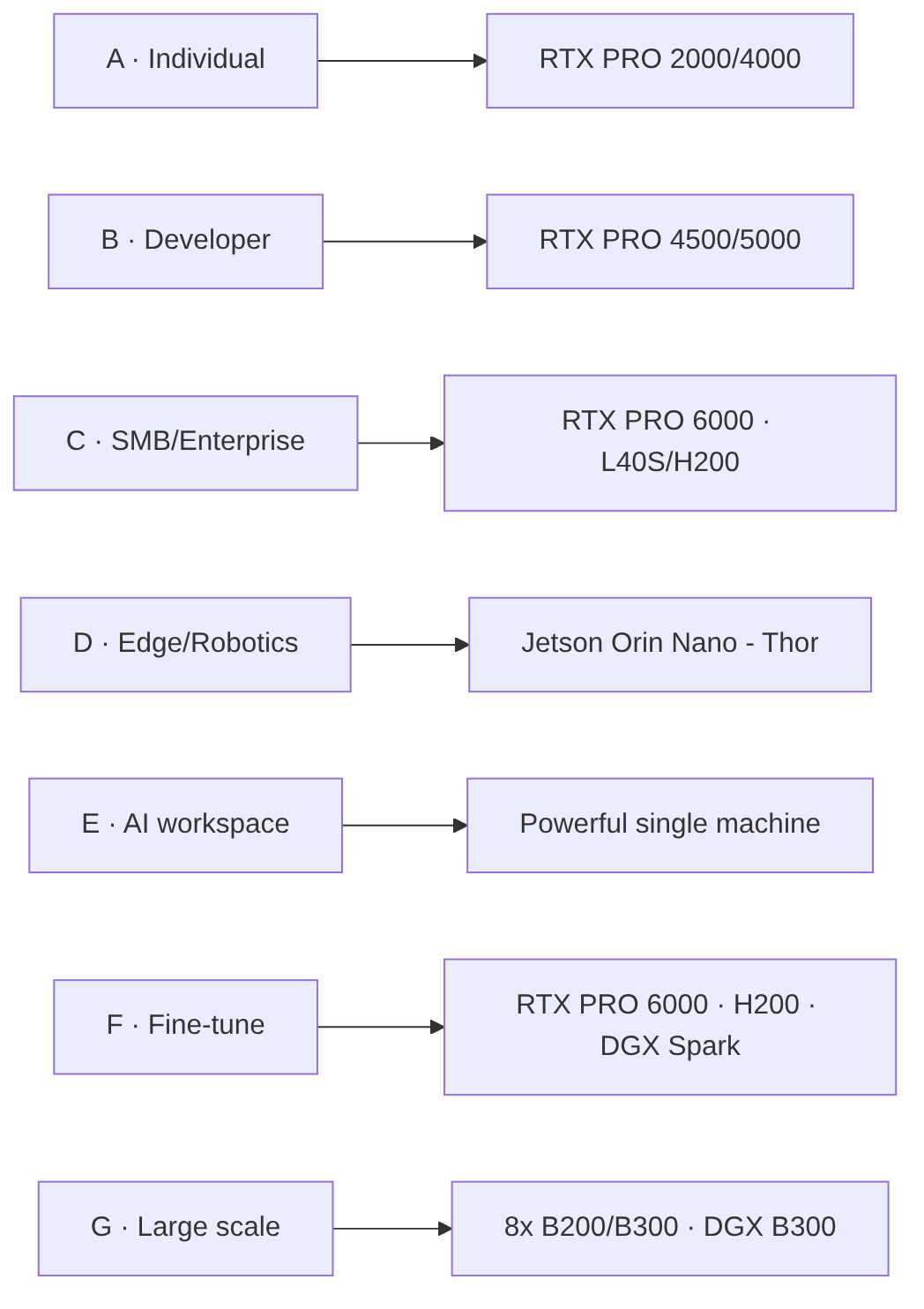
Figure: Scenario → hardware mapping
Scenario A — Individual / privacy-focused user (entry workstation). RTX PRO 2000 (16 GB) or RTX PRO 4000 (24 GB) → Ollama or LM Studio → an 8B–14B model (e.g. Qwen3 8B / Gemma 4 12B, Q4_K_M). Optionally Jan as the UI. Low power, silent, fully offline. For those who do not want to deal with setup, OpenZeka’s pre-installed and tested ready workstations are ready to use (openzeka.com/is-istasyonlari, see 4.5/B).
Scenario B — Developer (code assistant + integration). RTX PRO 4500 (32 GB) or RTX PRO 5000 (48 GB) → Ollama/LM Studio for personal use, vLLM or TensorRT-LLM for many requests/serving → a code model (Qwen3.6 / DeepSeek-Coder class). Thanks to the OpenAI-compatible endpoint, it connects directly to IDEs and your own tools; open-source tools such as OpenCode / Aider / Cline / Continue connect to the local model as a code assistant/agent (see 6.G). You can start without losing a day with an Ubuntu + NVIDIA stack pre-installed ready workstation (openzeka.com/is-istasyonlari, see 4.5/B).
Scenario C — SME / organization (document-based, multi-user). Server + RTX PRO 6000 (96 GB) or, for the data center, L40S / H100 NVL / H200 NVL → backend vLLM or TensorRT-LLM, on top of which OpenRAG-Local (CordatusAI) / AnythingLLM / RAGFlow as needed (RAG over company documents, multi-user, source citations). With an Apache/MIT-licensed model (Qwen/DeepSeek/GLM), it is commercially safe.
Scenario D — Edge / robotics / in the field. Jetson Orin Nano (8 GB) for small models, Jetson AGX Orin (64 GB) or AGX Thor (128 GB) for large models at the edge → llama.cpp/Ollama → on-device inference without internet. For embedded products, robots, and field applications.
Scenario E — Personal “AI workspace” (agent + memory + personal data). A powerful single machine → Odysseus or Khoj → email triage, calendar, notes, deep research, and persistent memory under one roof; backend as local Ollama/vLLM/llama.cpp. For those who want to go beyond “just chat.”
Scenario F — Model customization (fine-tune). To adapt a model to your own data: 7B–13B LoRA/QLoRA → 1× RTX PRO 6000 (96 GB) or 1× H200; 70B LoRA → 2–4× H200, 70B QLoRA → 1× DGX Spark (128 GB). Fine-tuning 70B on a single DGX Spark (QLoRA) is possible on the desktop; as the team grows, it scales with 2–3× ring. On the software side, Unsloth / LLaMA-Factory / Axolotl (LoRA/QLoRA) are used, and at large scale NeMo / DeepSpeed (see 6.F); validate the result on your own evaluation set (see 5.9).
Scenario F2 — Deep domain adaptation (full fine-tune). For deep domain adaptation where LoRA is insufficient (e.g., Turkish continued pre-training, medical/legal specialist models): 70B full fine-tune → 4–8× H200 (with ZeRO-3), ~1 TB VRAM. A low learning rate + mixing domain data with general data is essential to mitigate catastrophic forgetting (see 4.2). Software: NeMo / Megatron-LM / DeepSpeed (see 6.F).
Scenario G — Large-scale production / from-scratch training. High-traffic (500+ concurrent) inference or pre-training (from scratch) → 8× B200 / B300 (HGX/DGX team), at enterprise scale DGX B300 “AI Factory.” InfiniBand networking, server-class cooling, and TCO planning are mandatory (see 4.9). At ministry/agency scale, deployed on-prem so that data stays entirely within the institution.
8. Risks and Points to Consider
- Model source reliability. Download models from reputable sources (official Hugging Face cards); not from random repositories.
- Local network access control. Workspaces with agent/tool access (such as Odysseus, Hermes) may have shell and file access — protect them like an admin console: authentication enabled, do not expose directly to the internet, use a reverse proxy + HTTPS.
- Hallucination and accuracy. Local models can also make things up; in critical use, source grounding with RAG (cited answers) and human review are essential.
- License compliance. For commercial use, always verify the model license (especially for the Llama family and derivative Turkish models).
- Updates and sustainability. Both models and tools age quickly; plan regular updates and a maintenance owner.
Common mistakes in hardware sizing
- ✗ Small GPU, high expectation: trying to run a 70B model on a single L40S.
- ✗ Miscalculating total VRAM: ignoring the sum of weights + KV cache + activations + overhead.
- ✗ Treating B200/B300 as single cards: these are sold as a minimum 8-GPU team; plan the budget accordingly.
- ✗ Network bottleneck: overlooking InfiniBand/Ethernet bandwidth in multi-node.
- ✗ Cooling neglect: an 8× B200 server is ~15 kW+; check the cooling capacity.
- ✗ Not computing TCO: looking only at GPU price and ignoring electricity/cooling/maintenance.
- ✗ Ignoring quantization quality: using INT4/INT8 without testing the impact on model accuracy.
- ✗ Neglecting disk/storage speed: NVMe SSD is mandatory for model loading and checkpoints; HDD is too slow.
- ✗ PCIe bottleneck: not accounting for GPU–CPU bandwidth in multi-GPU.
- ✗ No scaling plan: not considering future growth in the initial purchase.
- ✗ Software stack incompatibility: CUDA/driver/framework version mismatch.
- ✗ No redundancy plan: service disruption on GPU failure.
Hardware sizing process

Figure: Hardware sizing process
Hardware sizing checklist
- ☐ Is the use case clear? (Training / Fine-tune / Inference)
- ☐ Are the target model size and family determined?
- ☐ Have candidate models been tested on your own evaluation set? (quality + TPS/TTFT + quantization loss — see 5.9)
- ☐ Is the number of concurrent users estimated?
- ☐ Are quality-of-service targets set? (TTFT, TPS)
- ☐ Is the VRAM requirement computed? (Weights + KV cache + overhead)
- ☐ Has a GPU comparison been done? (VRAM, FLOPS, bandwidth, sales unit)
- ☐ Is the 8-GPU team budget adequate for B200/B300?
- ☐ Is the technical specification prepared?
- ☐ Has a TCO analysis been done? (Hardware + electricity + cooling + maintenance)
- ☐ Has the infrastructure (power, cooling, network) been checked?
- ☐ Are approval and budget planning complete?
9. Conclusion and Recommendations
Decision matrix (summary):
| Your situation | Recommendation |
|---|---|
| Data sovereignty / government / sensitive data | Local LLM almost mandatory; Apache/MIT model + on-prem server |
| Intensive and continuous use | Local setup has the lowest long-term marginal cost |
| Occasional / light use | An entry-level card or existing workstation suffices |
| Entry workstation (low power) | RTX PRO 2000 (16 GB) / PRO 4000 (24 GB) + Ollama + 8–14B Q4 model |
| 70B+ required | RTX PRO 6000 (96 GB) / DGX Spark (128 GB) — RTX PRO 5000 (48 GB) only at the limit with Q4 + short context |
| Edge / robotics / field | Jetson Orin Nano (8 GB) → AGX Orin (64 GB) → AGX Thor (128 GB) |
| Multi-user production service | L40S / H100 NVL (94 GB) / H200 NVL (141 GB) + vLLM/TensorRT-LLM |
| Just chat | Ollama/LM Studio + (optionally) Open WebUI |
| Agent + personal data + memory | An AI workspace of the Odysseus / Khoj / Hermes class |
| Document-based Q&A | OpenRAG-Local (CordatusAI) / AnythingLLM / RAGFlow |
Future outlook. Three trends are clear: (1) thanks to MoE architecture, small “active-parameter” models are rapidly approaching large-model quality — so increasingly better results at the same compute cost (although memory requirements still depend on total parameters); (2) open-weight leadership has shifted to Chinese labs (Qwen, DeepSeek, GLM, Kimi), and commercial use has been made easier with Apache/MIT licenses; (3) the software layer has expanded from “chat UI” to “AI workspace” (agent + memory + personal data + hardware-aware model selection). With tools like Odysseus’s Cookbook, even “model selection” itself has begun to automate.
Closing recommendation. Start small: try an 8–14B model with an entry card like RTX PRO 2000/4000, or with Ollama/LM Studio on your existing machine; scale the hardware and software layer as needs clarify. Proceed with permissively licensed (Apache/MIT) models so there are no surprises when transitioning to commercial use. To evaluate together which hardware fits your needs, you can contact the OpenZeka team.
Glossary (Terms)
- LLM (Large Language Model): A model trained on very large text data that understands and generates natural language.
- Inference: Running a trained model only to produce responses.
- Fine-tuning: Adapting a pre-trained model to your own data. Full fine-tuning updates all model parameters (high VRAM, catastrophic forgetting risk — see 4.2); LoRA/QLoRA train only small adapter layers (low VRAM, base model preserved).
- LoRA / QLoRA: Efficient fine-tuning methods that train small additional layers rather than the whole model; QLoRA further reduces memory by quantizing.
- VRAM: Graphics card memory; the single hard constraint in local LLM.
- Token: The unit of text the model processes (roughly a piece of a word).
- Context: The token window the model considers at one time.
- KV cache: Holding the attention keys/values of generated tokens in memory; grows linearly with context length and concurrent requests.
- Quantization: Storing weights with fewer bits to reduce memory (FP16 → Q8 → Q4).
- GGUF: The most common local quantization file format for llama.cpp/Ollama.
- Q4_K_M: 4-bit quantization; retains ~92–95% of quality while reducing memory ~4×.
- FP16 / FP8 / INT4, MXFP4 / NVFP4: Numeric precision formats; as bits drop, memory/compute decrease. Blackwell supports hardware-native FP4.
- MoE (Mixture-of-Experts): Total parameters are large, but only a small “active” portion runs at each step.
- Active parameters: The number of parameters actually used per token in MoE; speed and cost track this.
- Dense model: The classic architecture where all parameters are used at every step.
- GQA (Grouped-Query Attention): An attention method that reduces KV cache and thus memory consumption.
- Prefill (prompt processing): The first stage of inference; all input tokens are processed in parallel, compute-bound.
- Decode / autoregressive generation: The stage where the response is generated token by token, sequentially; cannot be parallelized within a single request, memory-bound; stops at the EOS token or the maximum token limit.
- Speculative decoding: The large model verifies in a single pass the tokens proposed by a small draft model/head; speeds up decode 2–3× (e.g. EAGLE-3, MTP).
- Disaggregated prefill: Running the prefill and decode stages in separate GPU pools; each stage scales according to its own bottleneck.
- TTFT (Time to First Token): First-token latency; compute-bound (FLOPS-dependent).
- TPS (Tokens per second): Generation rate; memory-bound (memory-bandwidth-dependent).
- Throughput: Total requests/tokens processed per unit time; increases as batch grows.
- Batch: The group of requests processed at once; throughput↑ but latency↑.
- Memory bandwidth: The read speed of GPU memory (GB/s); determines TPS.
- FLOPS / TOPS: Compute capacity per second; affects training and TTFT.
- TDP: The card’s reference power consumption (Watts).
- Tensor / pipeline parallelism: Two methods for splitting a model across cards in multi-GPU.
- RAG (Retrieval-Augmented Generation): Retrieving relevant chunks from your own documents and having the model generate an answer.
- Embedding: A model that converts text into a semantic vector; the foundation of semantic search and RAG.
- Reranking: Re-ordering retrieved results by relevance.
- Vector database: A store that holds embeddings and performs similarity search.
- Agent: An LLM application that calls tools and carries out multi-step tasks.
- MCP (Model Context Protocol): An open standard that connects the model to external tools and data sources.
- Tool-calling / function-calling: The model’s ability to call defined tools/functions.
- Guardrail: A security/filter layer that audits input/output.
- Gateway / router: The single OpenAI-compatible access and routing layer in front of multi-model/multi-server setups.
- TCO (Total Cost of Ownership): The total of hardware + electricity + cooling + network + maintenance + personnel.
- Air-gapped (isolated): A classified network with no internet or external network connection, physically isolated.
Resources
The figures below (TFLOPS, memory bandwidth, power values, and benchmark scores) were compiled as of June 2026 from the relevant official datasheets, model cards, and benchmark sites; for current values, consult the primary sources. Star counts are approximate and variable.
Hardware (technical specs, TDP):
- NVIDIA data center GPUs (B200, B300, H100/H200, L4, L40S) and DGX systems — https://www.nvidia.com/en-us/data-center/
- NVIDIA RTX PRO Blackwell workstation GPUs — https://www.nvidia.com/en-us/products/workstations/
- NVIDIA Jetson (Orin, Thor) edge platforms — https://developer.nvidia.com/embedded-computing
Inference engines & measurement:
- vLLM https://docs.vllm.ai · TensorRT-LLM https://github.com/NVIDIA/TensorRT-LLM · SGLang https://github.com/sgl-project/sglang
Fine-tune & training frameworks:
- Unsloth https://github.com/unslothai/unsloth · LLaMA-Factory https://github.com/hiyouga/LLaMA-Factory · Axolotl https://github.com/axolotl-ai-cloud/axolotl · HF TRL https://github.com/huggingface/trl · NVIDIA NeMo https://github.com/NVIDIA-NeMo/NeMo · DeepSpeed https://github.com/deepspeedai/DeepSpeed
Coding assistants & agents:
- OpenCode https://github.com/sst/opencode · Aider https://github.com/Aider-AI/aider · Cline https://github.com/cline/cline · Continue https://github.com/continuedev/continue · OpenHands https://github.com/All-Hands-AI/OpenHands · Tabby https://github.com/TabbyML/tabby
Model families & licenses (model cards, Hugging Face):
- Qwen https://huggingface.co/Qwen · DeepSeek https://huggingface.co/deepseek-ai · Llama https://huggingface.co/meta-llama · Gemma https://huggingface.co/google · Mistral https://huggingface.co/mistralai · Phi https://huggingface.co/microsoft
Comparison & benchmarks:
- Artificial Analysis https://artificialanalysis.ai · LMArena https://lmarena.ai · llm-stats.com https://llm-stats.com · SWE-bench https://www.swebench.com
- GPQA, AIME, MMLU-PRO, MATH-500 — relevant academic publications (arXiv) and Hugging Face datasets
- Turkish benchmarks: TurkishMMLU, Cetvel, TurkBench — relevant datasets/repositories on Hugging Face
Software repositories: §6 gives the official GitHub/site link for each tool (with license · approximate stars).
Tools: Cordatus VRAM Calculator — https://app.cordatus.ai/#/vram-calculator
Notes
- Hardware scope: The hardware recommendations in this guide are limited to the OpenZeka catalog (RTX PRO Blackwell, data center GPUs, DGX, Jetson); consumer GeForce cards are not included. Prices are not listed because they are quote/project-based and variable — for current pricing and availability, please contact us.
- Currency: This field changes rapidly; model versions, release numbers, and benchmark results are valid as of June 2026. What endures is the decision logic in the sections, not the names.
- OpenRAG-Local: The OpenRAG featured in this guide for document Q&A is the CordatusAI/openrag-local contribution, which OpenZeka/Cordatus forked from
langflow-ai/openrag, adapted to run fully locally, and released as open source.
Let’s plan your local LLM infrastructure together. For the right hardware–model–software match, VRAM sizing, and TCO analysis, contact OpenZeka: openzeka.com · VRAM calculator: Cordatus VRAM Calculator